Stream Wireless APN Settings
Stream Wireless 4G LTE APN Settings for Android iPhone Samsung Galaxy S8 S9 Note HTC
Stream Wireless runs on AT&T and uses the APN PRODATA (MCC 310, MNC 410), with the MMSC http://mmsc.mobile.att.net and proxy proxy.mobile.att.net.
Stream Wireless APN Settings for Android
On Samsung Galaxy go to Settings -> Connections -> Mobile networks -> Access Point Names -> Add. On Google Pixel and other stock Android phones go to Settings -> Network & internet -> SIMs -> Access Point Names -> +
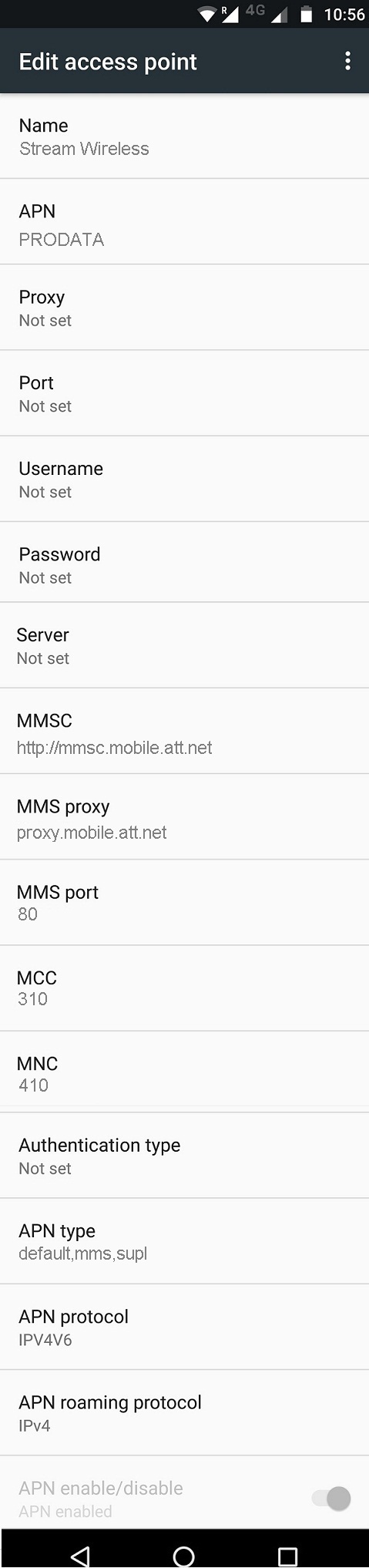
Name : Stream Wireless
APN : PRODATA
Proxy : Not Set
Port : Not Set
Username : Not Set
Password : Not Set
Server : Not Set
MMSC : http://mmsc.mobile.att.net
MMS Proxy : proxy.mobile.att.net
MMS Port : 80
MCC : 310
MNC : 410
Authentication Type : Not Set
APN type : default,mms,supl
APN protocol: Ipv4
APN roaming protocol: Ipv4
Enable/disable APN: APN Enabled
Bearer: Unspecified
MVNO type : None
MVNO Value : Not set
Stream Wireless iPhone APN
On iPhone go to Settings -> Mobile Service (Cellular on older iOS) -> Mobile Data Network and enter the details below.
Cellular Data:
APN: PRODATA
Username: Blank
Password: Blank
LTE Setup(Optional):
APN: Blank
Username: Blank
Password: Blank
MMS:
APN : PRODATA
Username: blank
Password: blank
MMSC: http://mmsc.mobile.att.net
MMS Proxy: proxy.mobile.att.net:80
MMS Message Size: 1048576
MMS UA Prof URL: http://www.apple.com/mms/uaprof.rdf
WiFi Dongle Settings
Go to Settings -> Profile Management
Profile Name : Internet
APN: PRODATA
Access number: *99#
User name: Blank
Password: Blank
Stream Wireless Data Not Working?
- Confirm the Stream Wireless plan is active and includes mobile data.
- Enter PRODATA exactly as shown, save, then pick it in the list.
- Turn Mobile data off and on, or switch Airplane mode on and off.
- If it still fails, restart the phone.


