Cincinnati Bell APN Settings for Android
Cincinnati Bell 5G 4G LTE Internet and MMS APN Settings for Android HTC Samsung Galaxy M21 M31 F41 S20+ S21 S21+ 5G Note Tab Nexus Dongle WiFi
Carrier status (October 2026): Cincinnati Bell closed its wireless network in 2015 and sold its spectrum to Verizon. See the Verizon APN settings. The original settings below are kept for reference.
Cincinnati Bell APN For Android
On Samsung Galaxy go to Settings -> Connections -> Mobile networks -> Access Point Names -> Add. On Google Pixel and other stock Android phones go to Settings -> Network & internet -> SIMs -> Access Point Names -> +
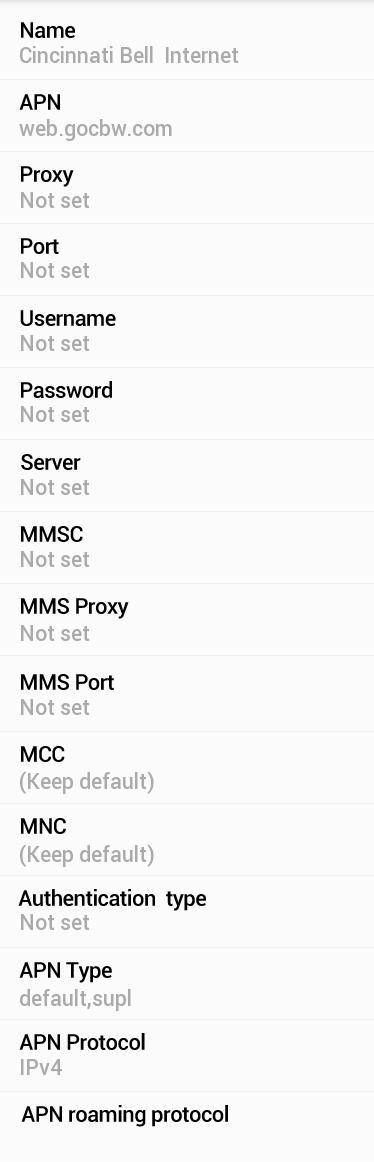
Name : Cincinnati Bell Internet
APN : web.gocbw.com
Proxy : Not Set
Port : Not Set
Username : Not Set
Password : Not Set
Server : Not Set
MMSC : Not Set
MMS Proxy : Not Set
MMS Port : Not Set
MCC : 310
MNC : 420
Authentication Type : Not Set
APN type : default,supl
APN protocol: Ipv4
APN roaming protocol: Ipv4
Enable/disable APN: APN Enabled
Bearer: Unspecified
MVNO type : None
MVNO Value : Not set
MMS APN For Android
Name : Cincinnati Bell MMS
APN : wap.gocbw.com
Proxy : Not Set
Port : Not Set
Username : Not Set
Password : Not Set
Server : Not Set
MMSC : http://mms.gocbw.com:8080/mms
MMS Proxy : 216.68.79.202
MMS Port : 80
MCC : 310
MNC : 420
Authentication Type : Not Set
APN type : mms
APN protocol: Ipv4
APN roaming protocol: Ipv4
Enable/disable APN: APN Enabled
Bearer: Unspecified
MVNO type : None
MVNO Value : Not set


