Metfone 4G LTE APN Settings Cambodia
Metfone Cambodia 4G Internet and MMS Settings for Android (Galaxy S26, Pixel 11, Oppo, Vivo) and iPhone 17, iPhone Air and iPhone 18 Pro
Settings last verified: November 2026.
Quick answer: data uses the APN metfone and MMS uses mms; or send SET to 234.
Automatic Internet Settings
Send SET to 234. You will get three SMS (MMS, browser and streaming); save all three with the PIN 1111 and restart the phone.
Metfone APN Settings for Android
Galaxy S26 and other Samsung phones (One UI 9): tap Settings -> Connections -> Mobile networks -> Access Point Names, then Add. Pixel 11 and other phones on Android 17: tap Settings -> Network & internet -> SIMs -> Access Point Names, then +.
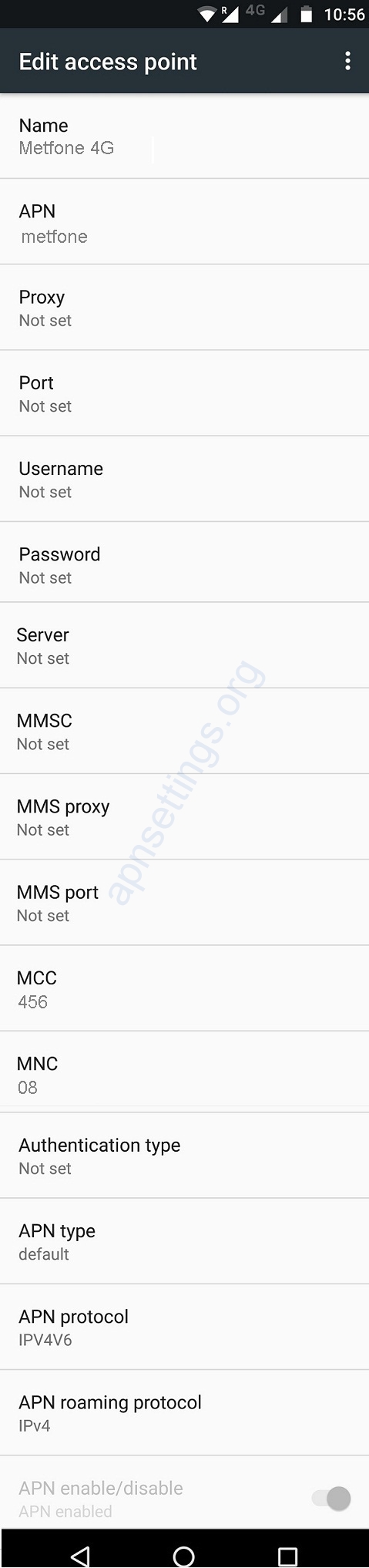
Internet Settings:
Name : Metfone 4G
APN : metfone
Proxy : Not Set
Port : Not Set
Username : Not Set
Password : Not Set
Server : Not Set
MMSC : Not Set
MMS Proxy : Not Set
MMS Port : Not Set
MCC : 456
MNC : 08
Authentication Type : Not Set
APN type : default
APN protocol: Ipv4
APN roaming protocol: Ipv4
Enable/disable APN: APN Enabled
Bearer: Unspecified
MVNO type : None
MVNO Value : Not set
MMS Settings:
Name : Metfone MMS
APN : mms
Proxy : Not Set
Port : Not Set
Username : Not Set
Password : Not Set
Server : Not Set
MMSC : http://192.168.24.10:38090
MMS Proxy : 192.168.23.85
MMS Port : 8080
MCC : 456
MNC : 08
Authentication Type : Not Set
APN type : mms
APN protocol: Ipv4
APN roaming protocol: Ipv4
Enable/disable APN: APN Enabled
Bearer: Unspecified
MVNO type : None
MVNO Value : Not set
Metfone APN Settings for iPhone / iPad
On an iPhone 17, iPhone Air or iPhone 18 Pro (iOS 27) tap Settings -> Mobile Service -> Mobile Data Network and enter these values:

Cellular Data:
APN: metfone
Username: Blank
Password: Blank
LTE Setup (optional):
APN: Blank
Username: Blank
Password: Blank
MMS:
APN: mms
Username: blank
Password: blank
MMSC: http://192.168.24.10:38090
MMS Proxy: 192.168.23.85:8080
MMS Message Size: 1048576
MMS UA Prof URL: blank
A Few Tips
- When the settings SMS arrive, save them with the PIN 1111, then restart the phone.
- Metfone uses MCC 456 and MNC 08.

