Azercell APN Settings
Azercell Azerbaijan 4G LTE 3G Internet and MMS APN Settings for Android HTC Galaxy S iPhone iPad
Settings last verified: October 2026.
Settings via SMS
Send a blank (empty) SMS to 9595 from the device. (SMS to 9595 costs 0.01 AZN). You will receive the settings as SMS.
Azercell APN Settings for Android:
On Samsung Galaxy go to Settings -> Connections -> Mobile networks -> Access Point Names -> Add. On Google Pixel and other stock Android phones go to Settings -> Network & internet -> SIMs -> Access Point Names -> +
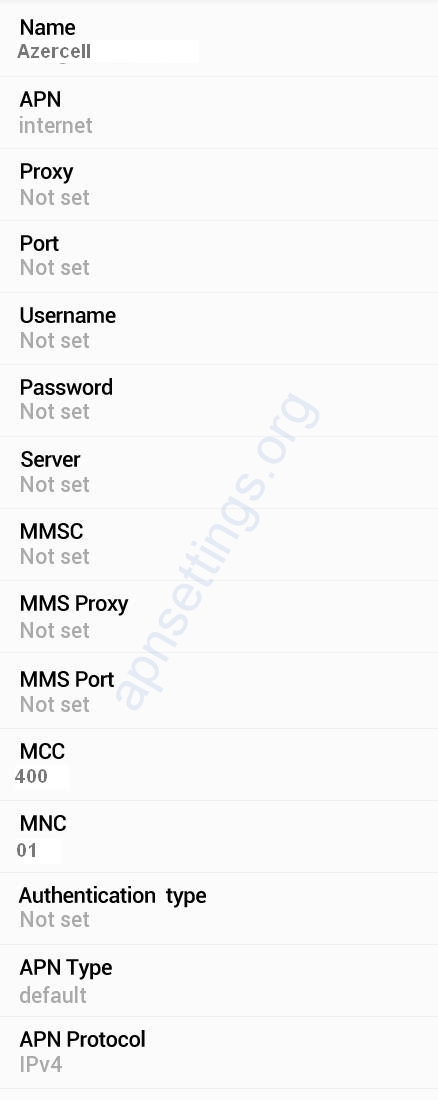
Internet APN:
Name : Azercell Internet
APN : internet
Proxy : Not Set
Port : Not Set
Username : Not Set
Password : Not Set
Server : Not Set
MMSC : Not Set
MMS Proxy : Not Set
MMS Port : Not Set
MCC : 400
MNC : 01
Authentication Type : Not Set
APN type : default
APN protocol: Ipv4
APN roaming protocol: Ipv4
Enable/disable APN: APN Enabled
Bearer: Unspecified
MVNO type : None
MVNO Value : Not set
MMS APN:
Name : Azercell MMS
APN : mms
Proxy : Not Set
Port : Not Set
Username : Not Set
Password : Not Set
Server : Not Set
MMSC : http://mms.azercell.com/cMMSC/post
MMS Proxy : 10.0.154.101
MMS Port : 9201
MCC : 400
MNC : 01
Authentication Type : Not Set
APN type : mms
APN protocol: Ipv4
Azercell APN Settings for iPhone:
In your Apple iPhone go to Settings -> Mobile Service (Cellular) -> Mobile Data Network. and enter the following details
Cellular Data:
APN: internet
Username: Blank
Password: Blank
MMS:
APN: mms
Username: blank
Password: blank
MMSC: http://mms.azercell.com/cMMSC/post
MMS Proxy: 10.0.154.101:9201
MMS Message Size: 1048576
MMS UA Prof URL: blank