TruPhone APN Settings
TruPhone 4G LTE 3G Internet and MMS Settings for iPhone X Xplus 8S 7Plus 6S Android Samsung Galaxy HTC Nexus
Carrier status (October 2026): Truphone is now part of 1GLOBAL.
Settings last verified: November 2026.
Truphone uses the APN truphone.com for both data and MMS, with the MMSC http://mmsc.truphone.com:1981/mm1. No username or password is needed.
TruPhone APN Settings for Android
On Samsung Galaxy go to Settings -> Connections -> Mobile networks -> Access Point Names -> Add. On Google Pixel and other stock Android phones go to Settings -> Network & internet -> SIMs -> Access Point Names -> +
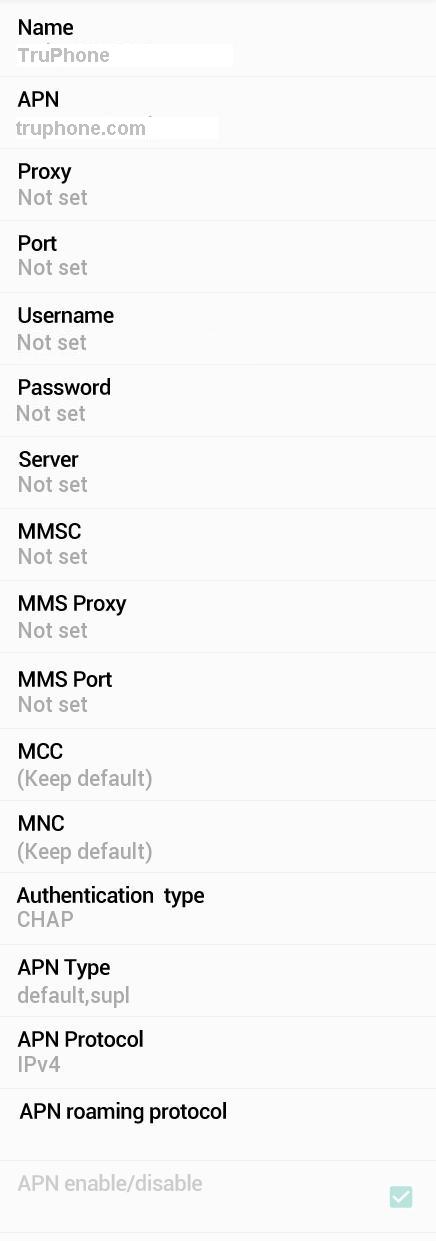
Name : TruPhone
APN : truphone.com
Proxy : Not Set
Port : Not Set
Username : Not Set
Password : Not Set
Server : Not Set
MMSC : http://mmsc.truphone.com:1981/mm1
MMS Proxy : Not Set
MMS Port : Not Set
MCC : 234
MNC : 25
Authentication Type : Not Set
APN type : default,supl,mms
APN protocol: Ipv4
APN roaming protocol: Ipv4
Enable/disable APN: APN Enabled
Bearer: Unspecified
MVNO type : None
MVNO Value : Not set
TruPhone APN Settings for iPhone
On iPhone go to Settings -> Mobile Service (Cellular on older iOS) -> Mobile Data Network and enter the details below.
Cellular Data:
APN: truphone.com
Username: Blank
Password: Blank
MMS:
APN: truphone.com
Username: blank
Password: blank
MMSC: http://mmsc.truphone.com:1981/mm1
MMS Proxy: blank
MMS Message Size: 1048576
MMS UA Prof URL: blank
WiFi Dongle Settings
Go to Settings -> Profile Management
Profile Name : Internet
APN: truphone.com
Access number: *99#
User name: Blank
Password: Blank
Truphone Data Not Working?
- Check that your Truphone plan includes data and that it is active.
- Type the APN as truphone.com and select it after saving.
- Turn on Data Roaming if you are using the SIM outside its home country.
- Turn Mobile data off and on, or switch Airplane mode on and off.
- Restart the phone if the connection still does not open.


