Virgin Mobile US APN Settings for Android Galaxy
Virgin Mobile US 4G LTE APN Settings for Android Samsung Galaxy S23 Ultra S23+ A Pro A53 GalaxyZ 5G Fold Fold Note Pixel 7 LG Xperia HTC.
Carrier status (October 2026): Virgin Mobile USA closed in 2020, and its customers were moved to Boost Mobile. See the Boost Mobile APN settings. The original settings below are kept for reference.
Virgin US APN Settings for Android
In your Android Smart Phone Go to – Settings -> More ->Cellular/MObile Network -> Access point Names -> + ( to add)
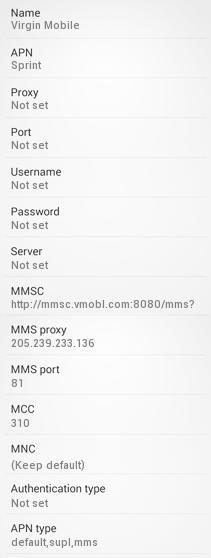
Name : Virgin US
APN : spring
Proxy : Not Set
Port : Not Set
Username : Not Set
Password : Not Set
Server : Not Set
MMSC : http://mmsc.vmobl.com:8080/mms?
MMS Proxy : 205.239.233.136
MMS Port : 81
MCC : 310
MNC : 490
Authentication Type : Not Set
APN type : default,supl,mms
APN protocol: Ipv4
Enable/disable APN: APN Enabled
Bearer: Unspecified
MVNO type : None
MVNO Value : Notset

