Tello APN Settings
Tello US 4G LTE Internet and MMS APN Settings for Android iPhone Windows Phone Galaxy Note S9 S8 Tab J7 HTC ZTE
Carrier status (October 2026): Tello now runs on the T-Mobile network. The settings below have been updated.
Tello APN Settings for Android
In your Android Smart Phone Go to – Settings -> More ->Cellular/MObile Network -> Access point Names -> + ( to add)
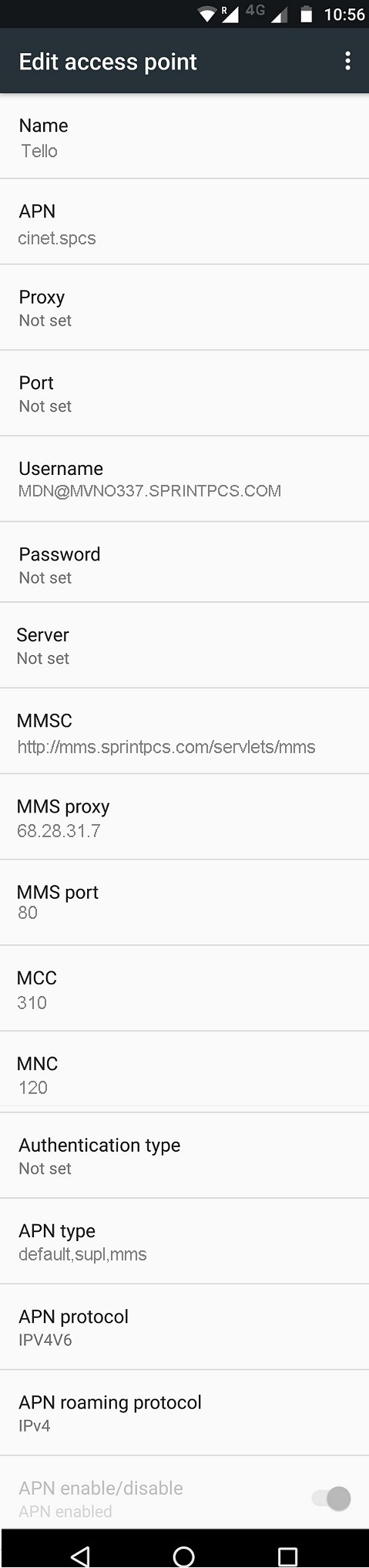
Name : Tello
APN :wholesale
Proxy : Not Set
Port : Not Set
Username : Not Set
Password : Not Set
Server : Not Set
MMSC : http://wholesale.mmsmvno.com/mms/wapenc
MMS Proxy : Not Set
MMS Port : 8080
MCC : 310
MNC : 240
Authentication Type : Not Set
APN type : default,supl,mms
APN protocol: Ipv4
APN roaming protocol: Ipv4
Enable/disable APN: APN Enabled
Bearer: LTE
MVNO type : None
MVNO Value : Not set
Tello APN Settings for iPhone
In your Apple iPhone go to Settings -> Cellular -> Cellular Data Network -> APN and enter the following details
Cellular Data:
APN: wholesale
Username: Not Set
Password: Blank
LTE Setup(Optional):
APN: Blank
Username: Blank
Password: Blank
MMS:
APN :wholesale
Username: Not Set
Password: blank
MMSC: http://wholesale.mmsmvno.com/mms/wapenc
MMS Proxy: Not Set
MMS Message Size: 1048576
MMS UA Prof URL: http://www.apple.com/mms/uaprof.rdf
Blackberry APN
Internet APN:
Tap Settings -> Network Connections -> Mobile Network ->APN
Access Point Name (APN) : wholesale
Username : Not Set
Password : Blank
Windows Phone APN
In your Windows Phone Go to Settings -> Network & Wireless -> Cellular & SIM Settings -> Add Internet APN
INTERNET APN
Profile Name: Internet
APN: wholesale
User name: Not Set
Password: Blank
Type of Sing-in-info : None
IP Type :Ipv4
Proxy server (URL): Blank
Proxy Port : Blank
WiFi Dongle Settings
Go to Settings -> Profile Management
Profile Name : Internet
APN: wholesale
Access number: *99#
User name: Not Set
Password: Blank


