Dialog 4G Internet Settings for Android
Dialog Sri Lanka 4G and 5G Internet and MMS Settings for Android: Samsung Galaxy S26, Galaxy A series, Google Pixel 11, Xiaomi, Oppo and other phones.
Settings last verified: November 2026.
Quick answer: use APN dialogbb on postpaid or ppwap on prepaid, with MCC 413 and MNC 02.
Dialog switched off its 3G network in November 2023. If your SIM is 2G/3G only, replace it with a 4G SIM.
Dialog APN Settings for Android
Galaxy S26 and other Samsung phones (One UI 9): tap Settings -> Connections -> Mobile networks -> Access Point Names, then Add. Pixel 11 and other phones on Android 17: tap Settings -> Network & internet -> SIMs -> Access Point Names, then +.
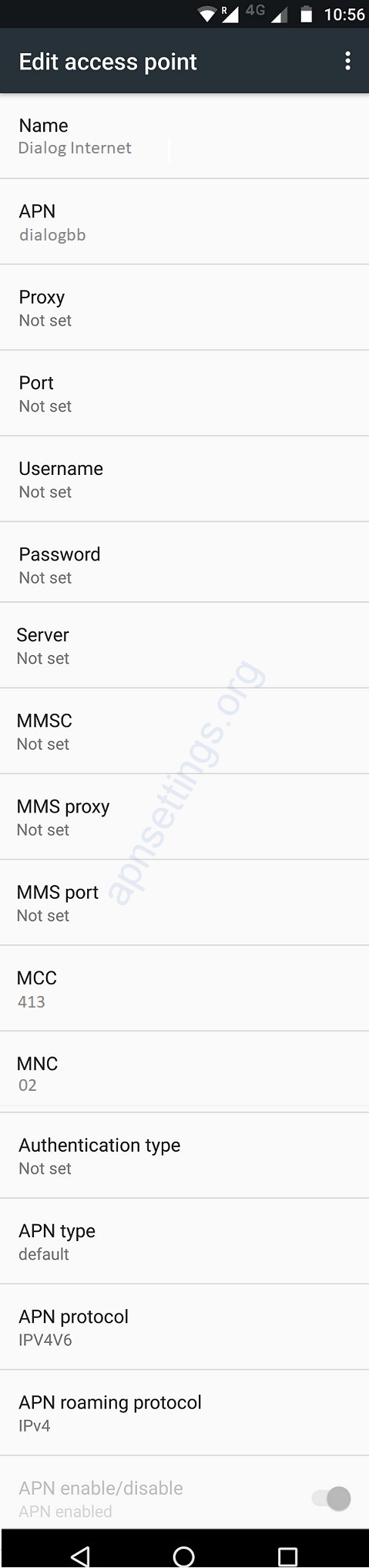
Dialog Internet
Name : Dialog Internet
APN : dialogbb (postpaid) or ppwap (prepaid)
Proxy : Not Set
Port : Not Set
Username : Not Set
Password : Not Set
Server : Not Set
MMSC : Not Set
MMS Proxy : Not Set
MMS Port : Not Set
MCC : 413
MNC : 02
Authentication Type : Not Set
APN type : default
APN protocol: Ipv4
APN roaming protocol: Ipv4
Enable/disable APN: APN Enabled
Bearer: Unspecified
MVNO type : None
MVNO Value : Not set
Dialog MMS
Name : Dialog MMS
APN : dialogbb (postpaid) or ppwap (prepaid)
Proxy : Not Set
Port : Not Set
Username : Not Set
Password : Not Set
Server : Not Set
MMSC : http://mms.dialog.lk:3130/mmsc
MMS Proxy : 192.168.122.2
MMS Port : 8080
MCC : 413
MNC : 02
Authentication Type : Not Set
APN type : mms
APN protocol: Ipv4
APN roaming protocol: Ipv4
Enable/disable APN: APN Enabled
Bearer: Unspecified
MVNO type : None
MVNO Value : Not set
A Few Tips
- Not sure whether your SIM is prepaid or postpaid? Try ppwap first; if data still does not start, switch to dialogbb.
- The MMS entry uses the same APN as data, plus the Dialog MMSC and proxy 192.168.122.2 on port 8080.


