Zain KSA 5G Internet Settings for Android
How to get Zain Mobile Saudi Arabia 4G LTE 5G Internet Settings for Android Samsung Galaxy S22 Ultra S22+ A53 GalaxyZ M21 M31 F62 M32 F41 S21 S21+ 5G Z FE 5G Fold Note Tab Sony Xperia LG HTC Desire.
Settings last verified: October 2026.
Zain SA APN Settings for Android
On Samsung Galaxy go to Settings -> Connections -> Mobile networks -> Access Point Names -> Add. On Google Pixel and other stock Android phones go to Settings -> Network & internet -> SIMs -> Access Point Names -> +
Internet Only Settings
Name : Zain Internet
APN : zain
Proxy : Not Set
Port : Not Set
Username : Not Set
Password : Not Set
Server : Not Set
MMSC : Not Set
MMS Proxy : Not Set
MMS Port : Not Set
MCC : 420
MNC : 04
Authentication Type : Not Set
APN type : default
APN protocol: Ipv4
APN roaming protocol: Ipv4
Enable/disable APN: APN Enabled
Bearer: Unspecified
MVNO type : None
MVNO Value : Not set
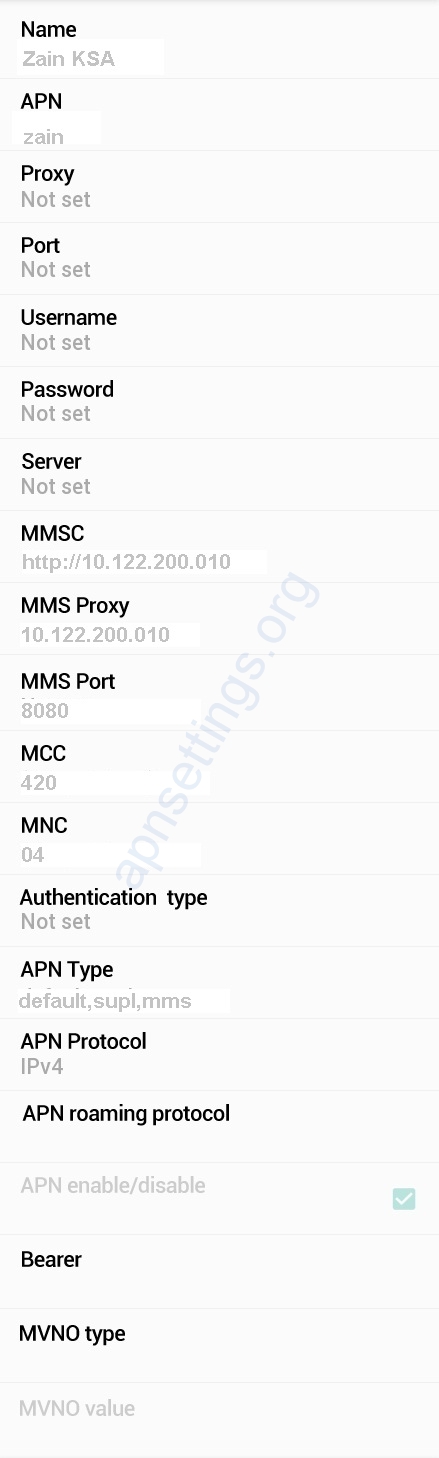
Internet and MMS Settings
Name : Zain KSA
APN : zain
Proxy : Not Set
Port : Not Set
Username : Not Set
Password : Not Set
Server : Not Set
MMSC : http://10.122.200.12:8002 (if MMS does not send, try http://10.122.200.10)
MMS Proxy : 10.122.200.10
MMS Port : 8080
MCC : 420
MNC : 04
Authentication Type : Not Set
APN type : default,supl,mms
APN protocol: Ipv4
APN roaming protocol: Ipv4
Enable/disable APN: APN Enabled
Bearer: Unspecified
MVNO type : None
MVNO Value : Not set


