Solo Mobile Internet Settings for Android
Solo Mobile Canada Internet and MMS Settings for Android (closed service)
Carrier status (November 2026): Solo Mobile ended prepaid service in July 2017, five years after it stopped signing up new customers. Bell handles the remaining accounts, so for a working setup use the Bell APN settings. The Solo values below are a record of the old setup.
Solo Mobile APN Settings for Android
On Android open Settings -> Mobile networks (or Network & internet -> SIMs) -> Access Point Names and tap + or Add.
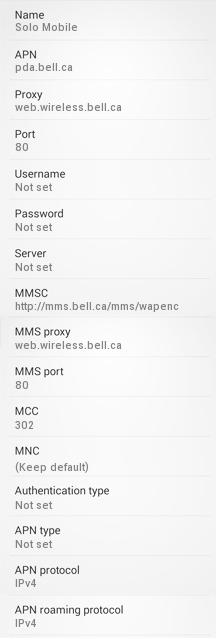
Name : Solo Mobile
APN : pda.bell.ca
Proxy : web.wireless.bell.ca
Port : 80
Username : Not Set
Password : Not Set
Server : Not Set
MMSC : http://mms.bell.ca/mms/wapenc
MMS Proxy : web.wireless.bell.ca
MMS Port : 80
MCC : 302
MNC : (keep default)
Authentication Type : Not Set
APN type : default,supl,mms
APN protocol: Ipv4
Enable/disable APN: APN Enabled
Bearer: Unspecified
MVNO type : None
MVNO Value : Not set


