Bell APN Settings for iPhone iPad
Bell Mobility 5G and 4G LTE APN Settings for iPhone 18 Pro, iPhone Air, iPhone 17, iPhone 17e and iPad
Bell LTE APN Settings for iPhone
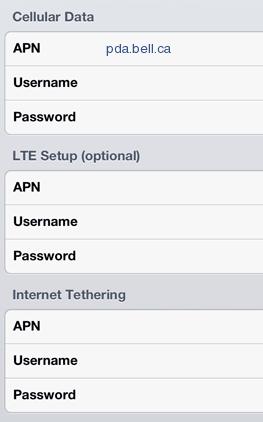 On iPhone 18 Pro, iPhone Air, iPhone 17 or 17e (iOS 27) tap Settings -> Cellular -> Cellular Data Network and type in these values:
Bell 5G and 4G LTE APN:
Cellular Data:
APN: pda2.bell.ca
Username: Blank
Password: Blank
LTE Setup (optional):
APN: Blank
Username: Blank
Password: Blank
MMS:
APN: pda2.bell.ca
Username: blank
Password: blank
MMSC: http://mms.bell.ca/mms/wapenc
MMS Proxy: web.wireless.bell.ca:80
MMS Message Size: 1048576
MMS UA Prof URL: blank
 Second option, pda.bell.ca (try it if pda2.bell.ca does not connect):
Cellular Data:
APN: pda.bell.ca
Username: Blank
Password: Blank
MMS:
APN: pda.bell.ca
Username: blank
Password: blank
MMSC: http://mms.bell.ca/mms/wapenc
MMS Proxy: web.wireless.bell.ca:80
MMS Message Size: 1048576
MMS UA Prof URL: blank
A Few Tips
- Most Bell iPhones fill these values in by themselves after a carrier settings update; enter them by hand only if data or picture messages fail.
- Picture messages go through mms.bell.ca with web.wireless.bell.ca on port 80 as the proxy.


