Chatr APN Settings for Android
Chatr Mobile Canada 5G and 4G LTE APN Settings for Android: Samsung Galaxy S26, Google Pixel 11, Motorola, OnePlus 15, Xiaomi and other Android phones, plus mobile hotspots.
Chatr APN Settings for Android
Samsung Galaxy S26, S26+ or S26 Ultra (One UI 9): open Settings -> Connections -> Mobile networks -> Access Point Names and tap Add.
Pixel 11 and other Android 17 phones: Settings -> Network & internet -> SIMs, pick your SIM, then Access Point Names -> +.
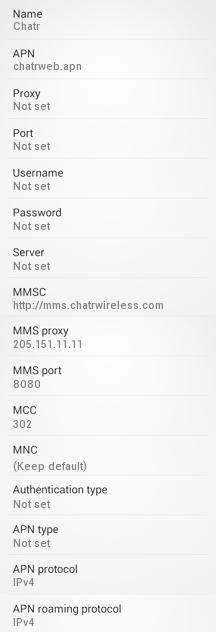
Name : Chatr
APN : chatrweb.apn
Proxy : Not Set
Port : Not Set
Username : Not Set
Password : Not Set
Server : Not Set
MMSC : http://mms.chatrwireless.com
MMS Proxy : mmsproxy.chatrwireless.com
MMS Port : 80
MCC : 302
MNC : 720
Authentication Type : Not Set
APN type : default,supl,mms
APN protocol: IPv4/IPv6
Enable/disable APN: APN Enabled
Bearer: Unspecified
MVNO type : None
MVNO Value : Not set
A Few Tips
- Chatr runs on the Rogers network, so MCC 302 and MNC 720 above are Rogers codes.
- Type chatrweb.apn in lower case, save it, then tap the new entry so it is selected.


