Telus APN Settings for iPhone
Telus Canada 5G and 4G LTE APN Settings for iPhone 18 Pro, iPhone Air, iPhone 17, iPhone 17e and iPad
Telus APN Settings for iPhone
On iOS 27 (iPhone 17, iPhone Air, iPhone 18 Pro) open Settings -> Cellular -> Cellular Data Network and fill in the fields below. If that menu is missing, the carrier profile already sets these values.
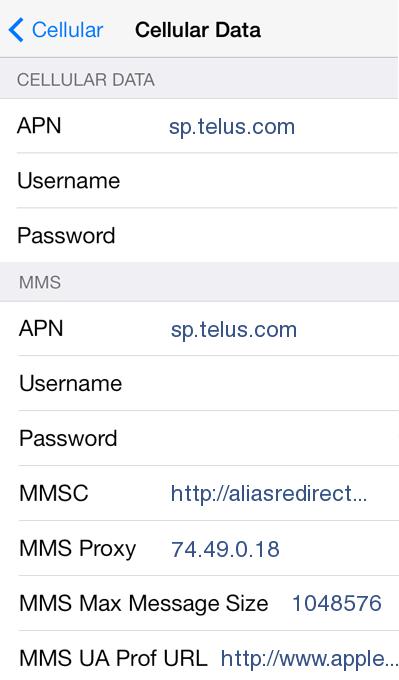
Cellular Data:
APN: sp.telus.com
Username: Blank
Password: Blank
MMS:
APN: sp.telus.com
Username: blank
Password: blank
MMSC: http://aliasredirect.net/proxy/mmsc
MMS Proxy: 74.49.0.18
MMS Message Size: 1048576
MMS UA Prof URL: blank
A Few Tips
- From a Telus phone, text MMS to 8900 and Telus replies with the picture message settings for your account.


