Fido LTE APN Settings For iPhone iPad
Fido APN Settings For iPhone
iPhone 17, 17e, iPhone Air or iPhone 18 Pro (iOS 27): Settings -> Cellular -> Cellular Data Network, then fill in each field as listed below.
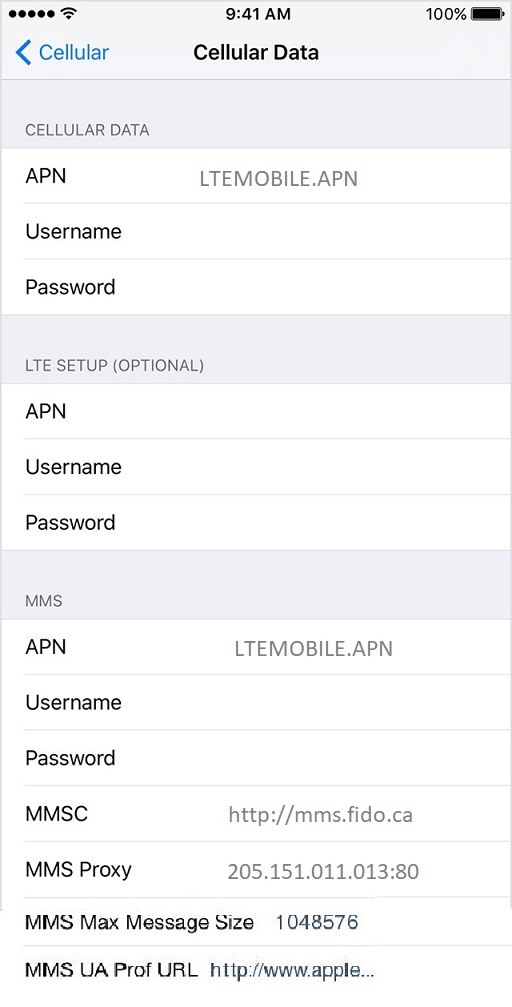
Cellular Data:
APN: LTEMOBILE.APN
Username: blank
Password: blank
LTE Setup(Optional):
APN: Blank
Username: Blank
Password: Blank
MMS:
APN: LTEMOBILE.APN
Username: Blank
Password: Blank
MMSC: http://mms.fido.ca
MMS Proxy: 205.151.11.13:80
MMS Message Size: 1048576
MMS UA Prof URL: blank
Older Internet APN Settings (3G-era phones)
Cellular Data:
APN: internet.fido.ca
Username: fido
Password: fido
LTE Setup(Optional):
APN: Blank
Username: Blank
Password: Blank
MMS:
APN: mms.fido.ca
Username: fido
Password: fido
MMSC: http://mms.fido.ca
MMS Proxy: 205.151.11.13:80
MMS Message Size: 1048576
MMS UA Prof URL: blank
A Few Tips
- Fido belongs to Rogers, and phones on LTE use LTEMOBILE.APN for both data and picture messages.


