Fido Internet Settings For Windows Phone 10
Fido APN Settings for Windows 10 Mobile and Windows Phone 8.1 (Nokia and Microsoft Lumia)
Windows phones no longer get software updates. On a current phone, use the Fido settings for Android or the Fido settings for iPhone.
Fido LTE APN Settings For Windows Phone
On Windows 10 Mobile open Settings -> Network & wireless -> Cellular & SIM -> SIM settings -> Add an internet APN
LTE APN (use this one first):
Profile Name: Fido LTE
APN: LTEMOBILE.APN
User name: blank
Password: blank
Sign-in type : None
IP Type :Ipv4
Proxy server (URL): Blank
Proxy Port : Blank
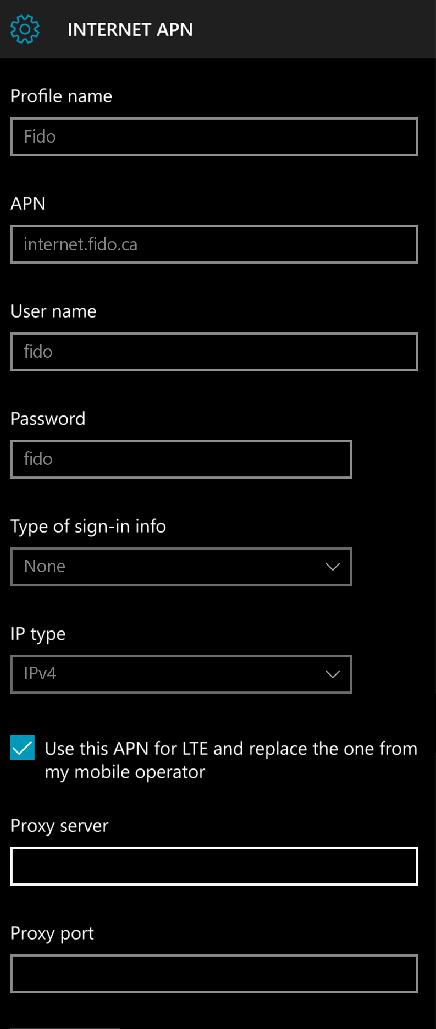
INTERNET APN
Profile Name: Fido Internet
APN: internet.fido.ca
User name: fido
Password: fido
Sign-in type : None
IP Type :Ipv4
Proxy server (URL): Blank
Proxy Port : Blank
MMS APN
Profile Name: Fido MMS
APN: mms.fido.ca
User name: fido
Password: fido
Sign-in type : None
IP Type :Ipv4
Proxy Server : Blank
Proxy Port : Blank
MMSC (URL): http://mms.fido.ca
MMSC Port: Blank
Maximum MMS Size (KB): 1024


