Aircel APN Settings for Windows Phone
Service closed: Aircel shut down its mobile network in 2018. If you moved your number to another operator, use that operator’s settings from our India APN settings. The settings on this page no longer work and are kept only as a record.
Defection : From 28 February 2018
Aircel 4G LTE APN Settings for Windows Phone 10 Microsoft Mobile
Aircel APN Settings for Windows Mobile
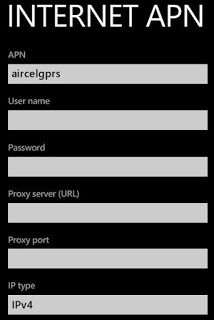
In your Lumia Windows Mobile Go to Settings -> Network & Wireless -> Cellular & SIM Settings -> Add Internet APN
INTERNET APN
Profile Name: Aircel Internet
APN: aircelgprs
User name: Blank
Password: Blank
Type of Sing-in-info : None
IP Type :Ipv4
Proxy server (URL): Blank
Proxy Port : Blank
Profile Name: Aircel MMS
APN: aircelmms
User name: Blank
Password: Blank
Type of Sing-in-info : None
IP Type :Ipv4
WAP Gateway (URL): 219.168.35.196
WAP gateway Port : 8080
MMSC(URL): http://mmsc/mmscrelay.app
MMSC Port:
Maximum MMS Size: 1024
Service closed: Aircel no longer runs, so the settings above will not connect.


